
Horvan Examy — NTA-style online MCQ tests and proctoring
Horvan Examy is the online exam module of Horvan Edu Coaching, the coaching centre app from Horvan Edu (a Horvans™ company). It gives students an NTA-style MCQ test screen and the centre the proctoring checks a browser can really make.
Horvan Examy is not made by, linked to or approved by the National Testing Agency (NTA).
What it does
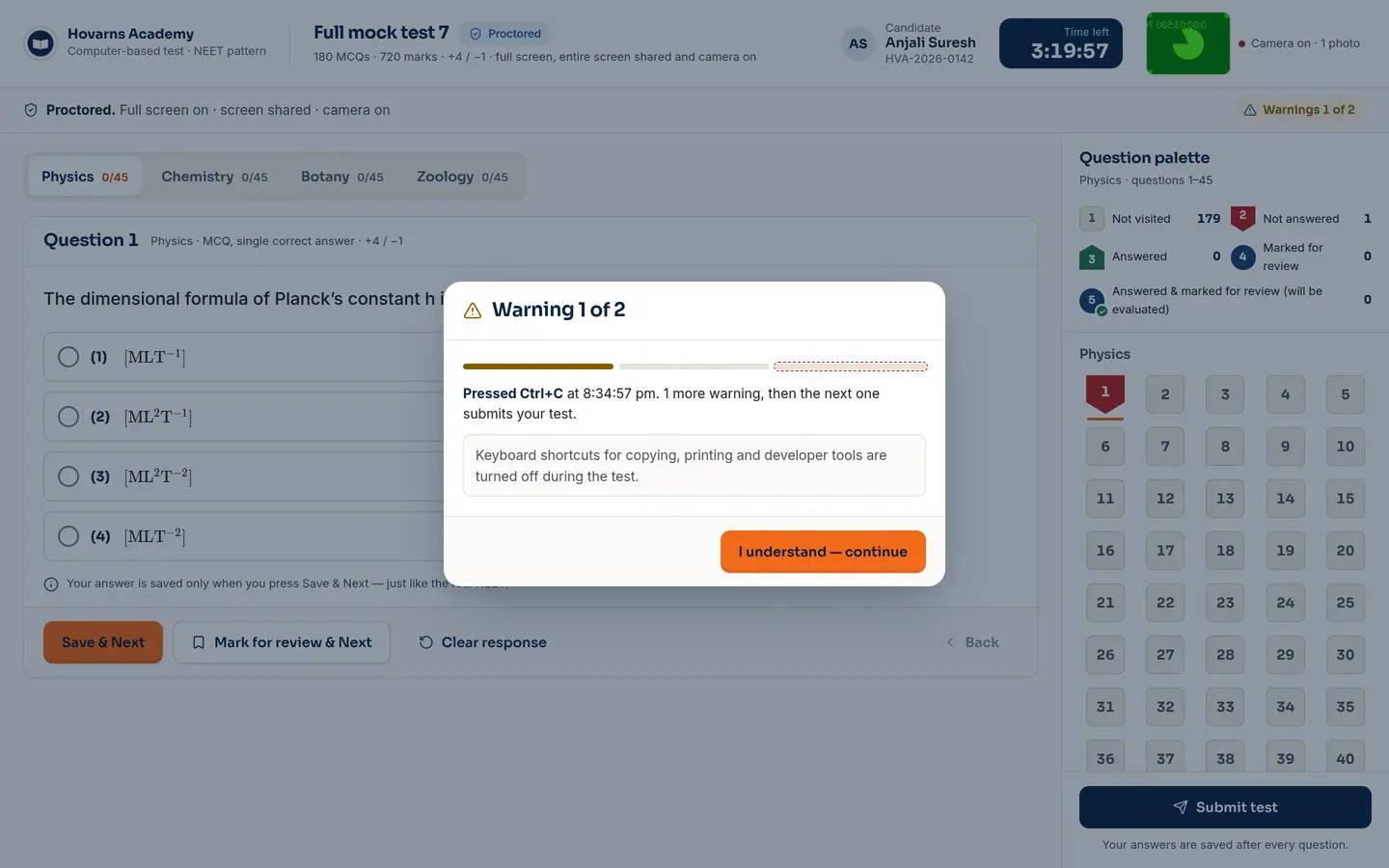
- The NTA-style screen: question palette, mark for review, timer, sections
- Before the test: full screen, whole-screen sharing, one monitor, optional camera
- During: tab switch, leaving full screen, copy shortcuts → two warnings, then auto-submit
- A live proctor grid with every candidate's status and flags
- Practice mode with no proctoring
Who it's for
Centres running online mocks and unit tests; students sitting them at home.
How another app uses it
Not a separate embed yet. These are the browser checks the module is built on:
// the student must share the whole screen, not a tab or a window
const s = await navigator.mediaDevices.getDisplayMedia({ video: { displaySurface: 'monitor' } });
s.getVideoTracks()[0].getSettings().displaySurface;   // 'monitor' or the test won't start

if (screen.isExtended) { /* a second monitor is connected — refuse to begin */ }
document.addEventListener('visibilitychange', () => { /* tab switched → warning */ });
document.addEventListener('fullscreenchange', () => { /* left full screen → warning */ });
Where it stands Preview
Working in the demo, including the warnings and auto-submit. Results are kept in the browser until the exam server lands. No browser can see a second phone or another person in the room, and the proctor screen says so.
Just need a quick MCQ test you can share with a link? Use the free Horvan Examy tool.
Questions about Horvan Examy
What is Horvan Examy?
Horvan Examy is the online MCQ exam module of Horvan Edu Coaching. It gives students an NTA-style exam screen with a question palette, mark for review, timer and sections, and gives the centre the proctoring checks a browser can really make.
What happens if a student switches tabs?
Switching tabs, leaving full screen or using a copy shortcut gives a warning. After two warnings the test is submitted automatically, and the live proctor grid shows every candidate's status and flags.
Can it stop all cheating?
No. A browser cannot see a second phone or another person in the room, and the proctor screen says so.
Can students practise without proctoring?
Yes. Practice mode has no proctoring checks.
Is it ready to use today?
It is a preview. It works in the demo, including the warnings and auto-submit. Results are kept in the browser until the exam server lands.
Is Horvan Examy linked to the NTA?
No. Horvan Examy is not made by, linked to or approved by the National Testing Agency (NTA).